
Board Meeting Minutes Format: Complete Guide + 3 Free Templates (2026)
The correct format for board meeting minutes — section by section, with formatting rules and 3 free downloadable Google Docs templates for governance boards, HOAs, and private boards.
The format of your board meeting minutes matters as much as the content.
Inconsistently formatted minutes are harder to review, harder to search for specific decisions, harder to hand off to successor officers, and — when an attorney or auditor requests them — harder to defend.
This guide covers the standard format for board meeting minutes, the rules that make minutes legally defensible, formatting differences by board type, and the three free templates we provide at BoardBreeze that you can download and use today.
Why Format Matters for Board Minutes
Board meeting minutes are official legal records. Their job is to document what your board decided — not what was said, not who argued what, not the full deliberation behind a vote. Just the decision, the vote count, the action assigned, and the date it happened.
A well-formatted minutes document:
- Makes it fast to find any motion or vote from any past meeting
- Proves that proper procedure was followed (quorum established, motion properly made and seconded, vote recorded)
- Protects board members from liability by showing decisions were made through proper governance
- Satisfies public records requests and audit requirements quickly
- Transfers cleanly when board officers change
A poorly formatted minutes document creates the opposite: confusion over what was decided, disputes about vote counts, gaps in the record that create legal exposure, and time lost hunting through inconsistent documents every time someone asks a question about a past decision.
The Standard Format: Section by Section
Board meeting minutes follow a consistent structure. Here is each section, what it should contain, and why it matters.
Header
Every set of minutes should start with:
- Organization name — the full legal name of the board, association, or governing body
- Governing body name — if different from the organization (e.g., "Board of Trustees" vs. "City College of San Francisco")
- Meeting type — Regular, Special, or Emergency
- Date
- Start time and end time
- Location — physical address or video platform name
This header establishes the legal identity of the meeting. Without it, the minutes cannot be matched to a specific board action.
Attendance and Quorum
List every board member by full name and title. Note who was present and who was absent. Then explicitly confirm whether a quorum was established.
This section is more important than it looks. Without a quorum, the board cannot legally take binding action. If the minutes do not confirm quorum, every motion voted on at that meeting can potentially be challenged. One sentence — "A quorum of four directors was present" — provides that protection.
Also note any staff, legal counsel, guests, or members of the public present, and the capacity in which they attended.
Call to Order
Note who called the meeting to order, their title, and the exact time. This is the official start of the meeting record.
Example: The Chair, Maria Rodriguez, called the meeting to order at 6:04 p.m.
Approval of Previous Minutes
Most meetings begin with approving the minutes from the prior meeting. Document this as a motion:
Example:
Motion: To approve the minutes of the January 14, 2026 regular meeting as distributed. Moved by: Director Thornton. Seconded by: Director Park. Vote: 5-0. Motion carried.
Agenda Items
This is the substantive section. For each agenda item, document:
1. Item title — use the same title as the posted agenda
2. Summary — 1-3 sentences capturing the key information presented and any significant discussion points. Do not attempt to be comprehensive. Focus on what the board decided and why, not what everyone said.
3. Motion (if applicable) — in its exact wording as stated by the maker of the motion. Do not paraphrase.
4. Mover and seconder — by name
5. Vote count — for, against, abstaining, and any recusals with reason (e.g., conflict of interest)
6. Outcome — motion passed or failed
Example of a complete agenda item:
Item IV.B — Approval of 2026-27 Operating Budget
The Finance Director presented the proposed operating budget totaling $4.2 million, a 3% increase over the prior year. The board discussed staffing allocations and the contingency reserve.
Motion: To approve the 2026-27 operating budget as presented. Moved by: Director Okafor. Seconded by: Director Chen. Vote: 4-1 (Director Williams opposed). Motion carried.
Public Comment
For public bodies subject to open meeting laws, document public comment periods. Note:
- The name of each speaker (if provided)
- A one-sentence summary of the topic they addressed
- Do NOT record verbatim remarks
Example: John Martinez, a community member, addressed the board regarding traffic concerns near the proposed development site.
This satisfies open meeting law documentation requirements without creating the liability of a verbatim transcript.
Action Items
Every task assigned during the meeting should be documented — either inline under each agenda item or in a consolidated table at the end of the minutes. Be consistent: pick one approach and use it at every meeting.
A consolidated action items table is easier to follow up on and more visible to board members reviewing the final minutes. Format:
| # | Action | Assigned To | Deadline |
|---|---|---|---|
| 1 | Obtain three contractor bids for roof repair | Executive Director | March 31 |
| 2 | Draft revised vendor policy for board review | Board Secretary | April meeting |
Adjournment
Document the motion to adjourn, who moved and seconded, the vote, and the exact time.
Example: There being no further business, Director Thompson moved to adjourn. Seconded by Director Park. Motion carried unanimously. The meeting was adjourned at 8:47 p.m.
Certification
After approval, the secretary signs and dates the minutes. Many boards also have the board chair co-sign. Include a line for this signature at the bottom of every minutes document.
3 Free Board Meeting Minutes Templates
We have created three Google Docs templates that implement these formatting standards. Each is formatted in Times New Roman 12pt — the same output format as BoardBreeze — and is designed to be ready for immediate use.
Click any link below to open the template. Google will prompt you to make a copy in your own Drive.
Template 1: Governance Board — Action Items Grouped
Best for public governing bodies following Robert's Rules: community college boards, school district boards, city councils, special districts, hospital boards. Action items are collected into a summary table at the end of the document — making it easy for staff to find all follow-up tasks in one place.
Includes: roll call vote format, public comment section, consent calendar, closed session documentation, and a consolidated action items table.
Template 2: Governance Board — Action Items Inline
Same governance structure as Template 1, but action items are documented inline under each agenda item rather than collected at the end. Best for HOAs, nonprofits, hospital boards, and other organizations where individual item accountability is more important than a consolidated follow-up list.
Template 3: Business/Private Board — Summary Format
For corporate boards, private company boards, and executive committees where formal parliamentary procedure is not required. Focuses on decisions, resolutions, and deliverables. Includes an action items summary table with owners and due dates.
Formatting Rules That Apply to All Minutes
Regardless of which template you use, these rules apply to every set of board meeting minutes:
Write in past tense. Everything that happened in the meeting is now in the past. "The board voted" not "the board votes."
Write in third person. "Director Johnson moved" not "I moved." Minutes are an official record, not a personal account.
Capture motions verbatim. This is the one place where exact wording matters. A paraphrase of a motion can create ambiguity about what the board actually authorized. Write down the exact words used.
Do not record dialogue. Minutes document decisions, not conversations. Summarize discussion in 1-3 sentences maximum, focusing on the outcome.
Be consistent across meetings. Use the same template, the same section headings, and the same motion format at every meeting. Consistency makes the minutes record defensible and searchable.
Date and version control. Keep draft versions labeled as "DRAFT" until approved. After approval, label with the approval date. Never overwrite the draft — retain both versions.
Formatting by Board Type
Different governance bodies have slightly different formatting conventions.
Public bodies (city councils, school boards, special districts): Roll call votes are standard — each member's vote is recorded by name. Public comment sections are required. Executive session documentation must follow specific legal formats by state.
HOA boards: Minutes typically use voice votes for routine items and roll call for significant decisions. California HOA minutes must be made available to members within 30 days under Civil Code §4950. For HOA-specific formatting, see our HOA board meeting minutes guide.
Nonprofit boards: IRS best practices recommend documenting conflicts of interest declarations and recusals explicitly. Consistent formatting supports Form 990 governance disclosures and grant audit trails.
Corporate/private boards: Resolutions and board authorizations must be exact — these are often the legal basis for contracts, loans, and other actions. Many corporate minutes attach written resolutions as exhibits rather than capturing them inline.
Common Formatting Mistakes
Recording too much discussion. The most common mistake. Discussion is not the record — decisions are. If your minutes read like a transcript of who said what, you are recording too much.
Paraphrasing motions. "The board approved the budget" is not the same as "The board voted to approve the 2026-27 operating budget in the amount of $4.2 million as presented." The second is a defensible record. The first raises questions.
Inconsistent section headings. When section headings change from meeting to meeting, searching for a specific item across months of records becomes a manual exercise.
Missing quorum confirmation. Skip this and every action taken at that meeting is potentially voidable.
No signature on approved minutes. Unsigned minutes are weaker evidence than signed ones. Make signing and dating approved minutes part of your standard workflow.
How AI Handles Minutes Formatting
The formatting challenges above — consistency, motion capture, section structure — are exactly what AI minutes software is designed to solve.
BoardBreeze processes your meeting audio and generates minutes in the structured format boards expect: sections by agenda item, motions in their exact wording, vote counts recorded, action items extracted and assigned. The output mirrors the templates above — Times New Roman 12pt, properly structured, ready for secretary review.
The result: instead of spending 2-4 hours formatting a transcript into minutes, the board secretary starts from a properly structured draft and spends 20-30 minutes reviewing for accuracy.
Try BoardBreeze free — upload a recording from your most recent board meeting and see what AI-formatted minutes look like before your next meeting.
Further Reading
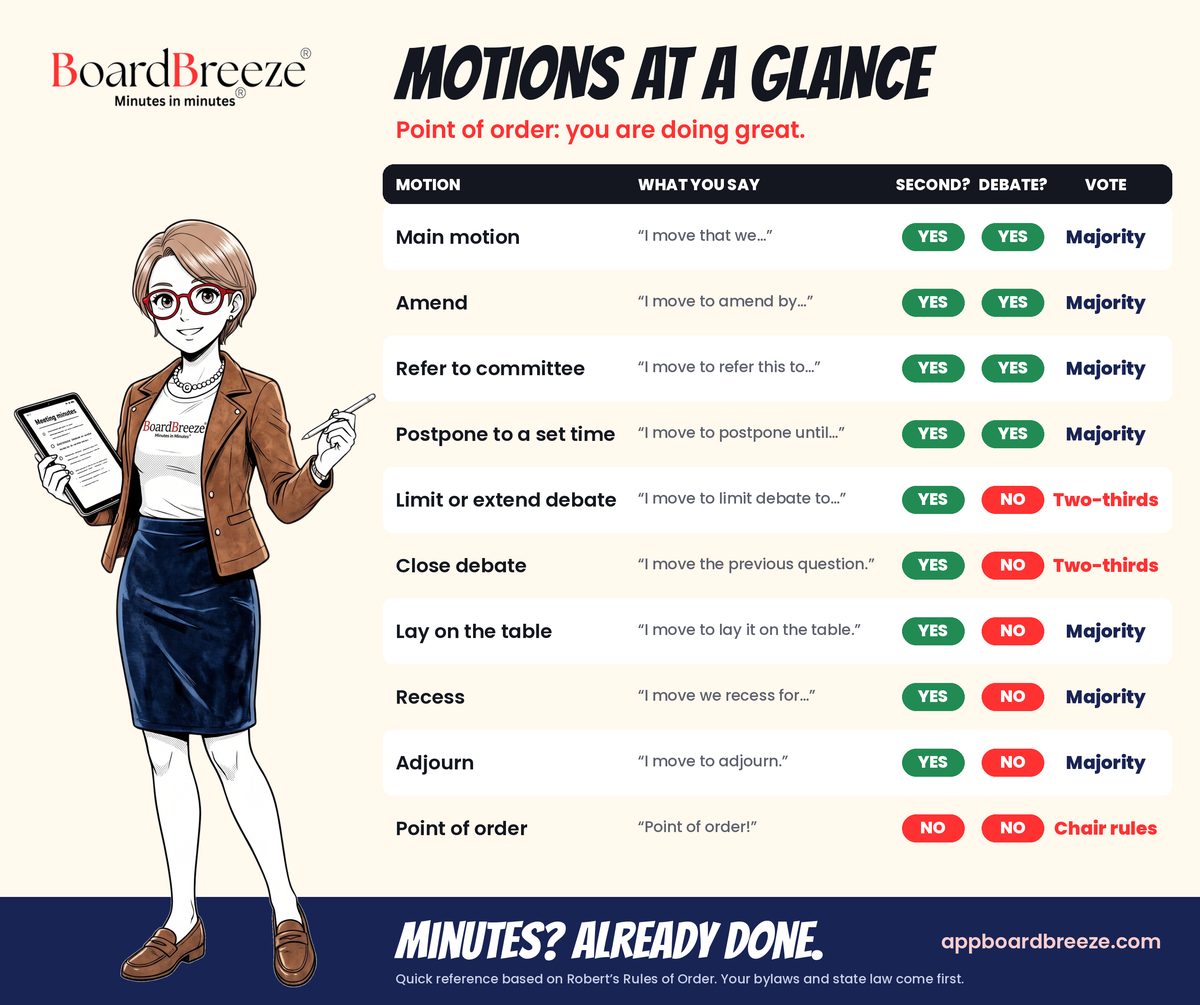
Motions at a Glance (free PDF)
Ten motions. Second, debate, and vote for each. One page.
The chart board clerks keep next to the keyboard for the moment the chair asks “does that need a second?” Based on Robert's Rules of Order. Your bylaws and state law come first.
BoardBreeze®
Stop Taking Minutes By Hand
BoardBreeze® converts your meeting audio into polished, compliant minutes automatically — no dedicated note-taker required.
Start Free 15-Day Trial →Ready to Automate Your Meeting Minutes?
BoardBreeze® turns your board meeting audio into polished, compliant minutes — Minutes in Minutes®, not hours.
Start Free TrialRelated Articles
The City Clerk's Agenda Preparation Workflow: From Call for Items to Posting
A backward planned agenda preparation workflow for city clerks: the call for items, staff report deadlines, legal review, the consent calendar, writing item descriptions that survive challenge, packet assembly, 72 hour posting, and late materials.
Board of Directors Meeting Minutes: Complete Guide + Free Template
How to write board of directors meeting minutes that are legally defensible, accurately capture corporate decisions, and satisfy due diligence and audit requirements. Includes free template.
How to Record Board Meeting Minutes from Audio (2026 Guide)
How to record a board meeting and convert the audio into formatted, compliant minutes — without a court reporter or hours of manual transcription. Step-by-step guide for board secretaries and clerks.